Quick Start Guide
Quick Start Guide - ISX031 8*Channel GMSL2 Camera Kit
| Product Image | SKU | Shutter Type | Sensor | Resolution | Features | Lens Mount | Field of View(HxV) | Focus Type | IR Sensitivity |
|---|---|---|---|---|---|---|---|---|---|
 |
B0608 | Rolling Shutter | ISX031 | 3MP | 8*Camera Kit, Ultra HDR, Built-in ISP, IP67 | M12 Mount | 152°(D)×120°(H)×92.8°(V) | Fixed Focus | 650nm IR-cut filter |
Device List
| Device | Quantity |
|---|---|
| NVIDIA Jetson AGX Orin | 1pcs |
| Arducam ISX031 GMSL2 Camera Module | 8pcs |
| 8*Channel GMSL2 Deserializer Board | 1pcs |
| FAKRA Coax Cable | 8pcs |
Hardware Connection
 |
 |
Note: The DIP switch settings for the Deserializer board should be configured as follows, and the standard power supply is 12V DC.

Install environment dependencies
sudo apt install v4l-utils
sudo apt install nvidia-l4t-gstreamer
Install Driver Package
Version Notice
Currently, only NVIDIA Jetson Linux Version 36.5.0 and above are supported.
Command to check Jetson Linux Version: `cat /etc/nv_tegra_release`
NVIDIA Jetson Linux Version: **36.5.0**:
<img src="https://cdn.arducam.com/wp-content/uploads/2026/05/arducam_wiki_b0608_isx031_gmsl_8_camera_picture_3.png">
- Download bash script
cd ~ && wget https://github.com/ArduCAM/MIPI_Camera/releases/download/v0.0.3/install_full.sh
- Install ISX031 Driver
chmod +x install_full.sh
./install_full.sh -m isx031_gmsl
- Check Camera Detection
Restart NVIDIA Jetson AGX Orin after installation.
ls /dev/video*

Run the Camera
Download the run.sh script file to the NVIDIA Jetson AGX Orin device.
- Add executable permissions
chmod +x ./run_8cams.sh
- Run the camera kit
./run_8cams.sh
Stop Streaming
Download the stop.sh script file to the NVIDIA Jetson AGX Orin device.
- Add executable permissions
chmod +x ./stop_all_cams.sh
- Stop streaming
./stop_all_cams.sh
Demonstration
Quick Start Guide - Robotics Vision 8*Camera GMSL Kit
| Product Image | SKU | Shutter Type | Sensor | Resolution | Features | Lens Mount | Field of View(HxV) | Focus Type | IR Sensitivity |
|---|---|---|---|---|---|---|---|---|---|
 |
B0580 | Global Shutter | AR0234 | 2.3MP | 8*Camera Kit, Synchronized Stereo(binocular) | M12 Mount | 110°(D)×98°(H)×75°(V) | Fixed Focus | 650nm IR-cut filter |
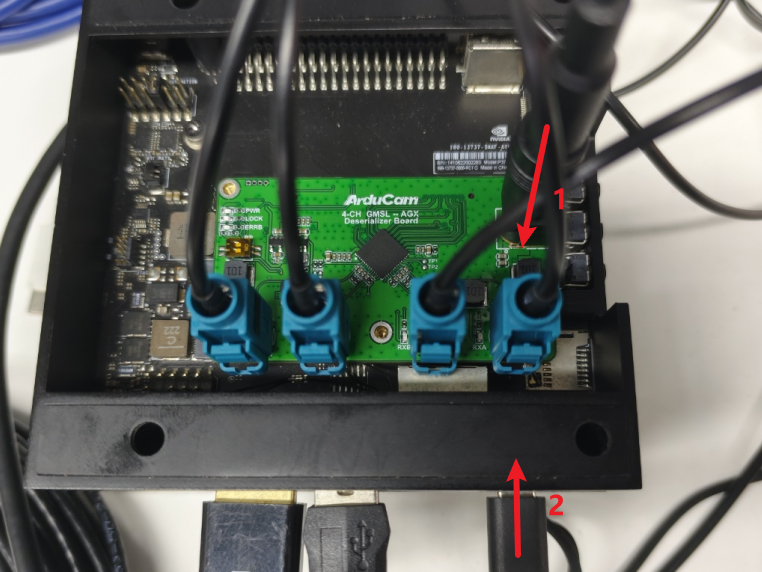
Hardware Connection
- Adjust the DIP switch
First, you need to turn both switch 1 and switch 2 to the ON state

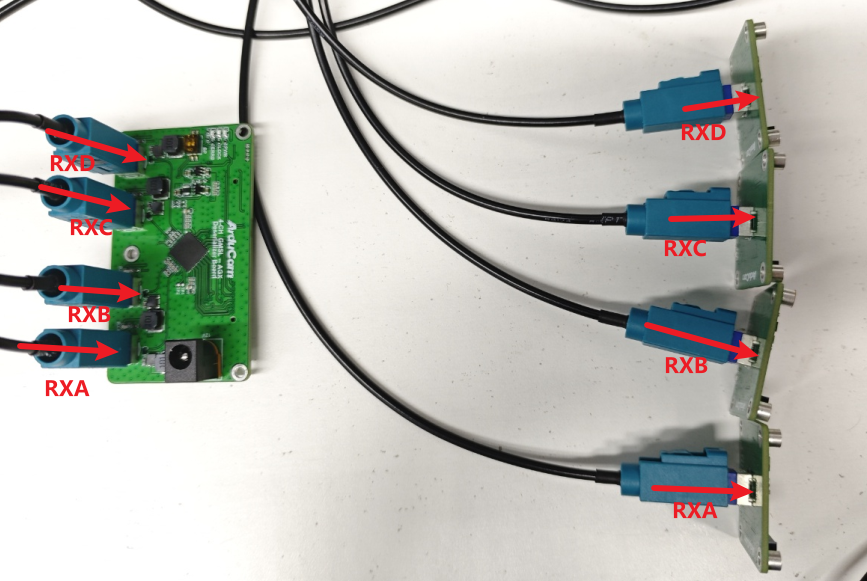
- Conenct GMSL Extension Cable
Connect one end of the four coaxial cables to the RXA/RXB/RXC/RXD channels of the camera assembly TX board respectively
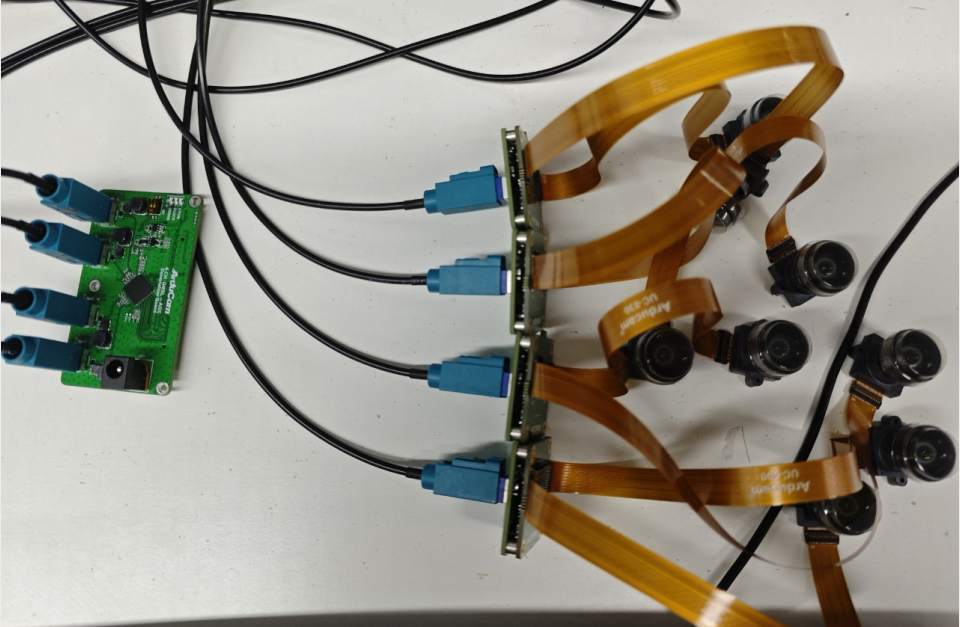
Connect the other end to the GMSL RX adapter board
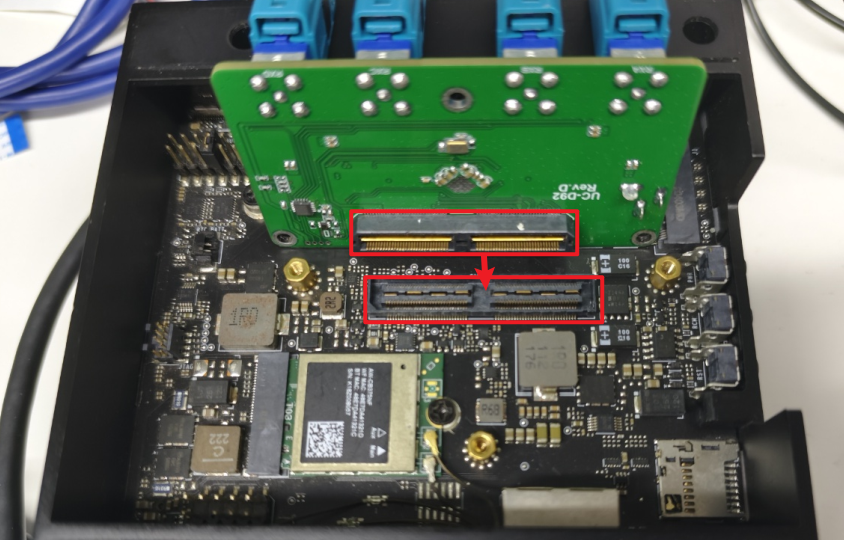
- Conenct NVIDIA AGX Orin
Connect the GMSL RX adapter board to the NVIDIA AGX Orin connector
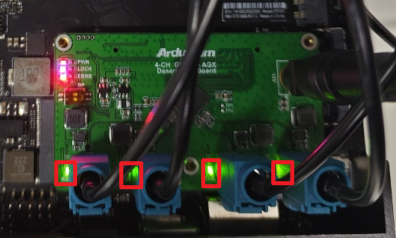
- Power on
Connect the external 12V power supply first, then power on the NVIDIA Jetson AGX Orin. The corresponding channel light will light up.
Software Guide
-
Install Camera Driver
cd ~ && wget https://github.com/ArduCAM/MIPI_Camera/releases/download/v0.0.3/install_full.sh
chmod +x install_full.sh
./install_full.sh -m arducam_gmsl # Reboot your system to take effect
-
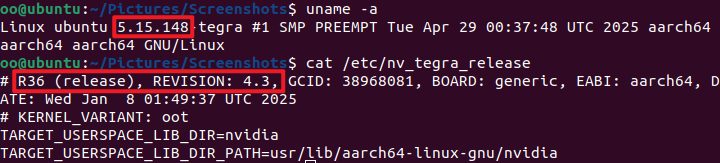
Usage Environment
NVIDIA Jetson test L4T version: 36.4.3, Jetpack 6.2
-
Preview
Open
qv4l2
# Channel A:
qv4l2 -R -d /dev/video0
# Channel B:
qv4l2 -R -d /dev/video1
# Channel C:
qv4l2 -R -d /dev/video2
# Channel D:
qv4l2 -R -d /dev/video3

Set Resolution
Select the resolution in the UI window and set Streaming Method to Memory mapped I/O

Execute

-
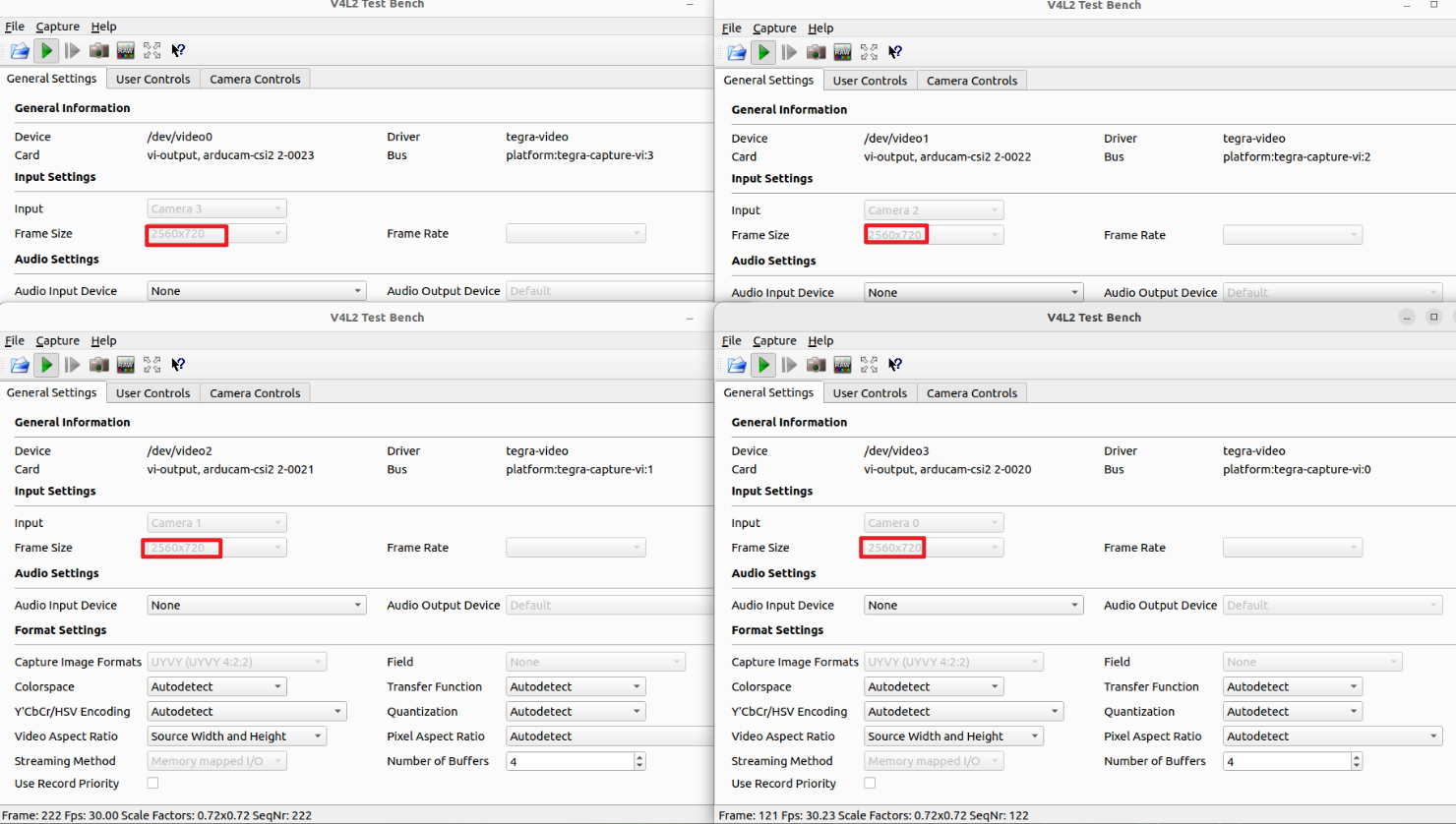
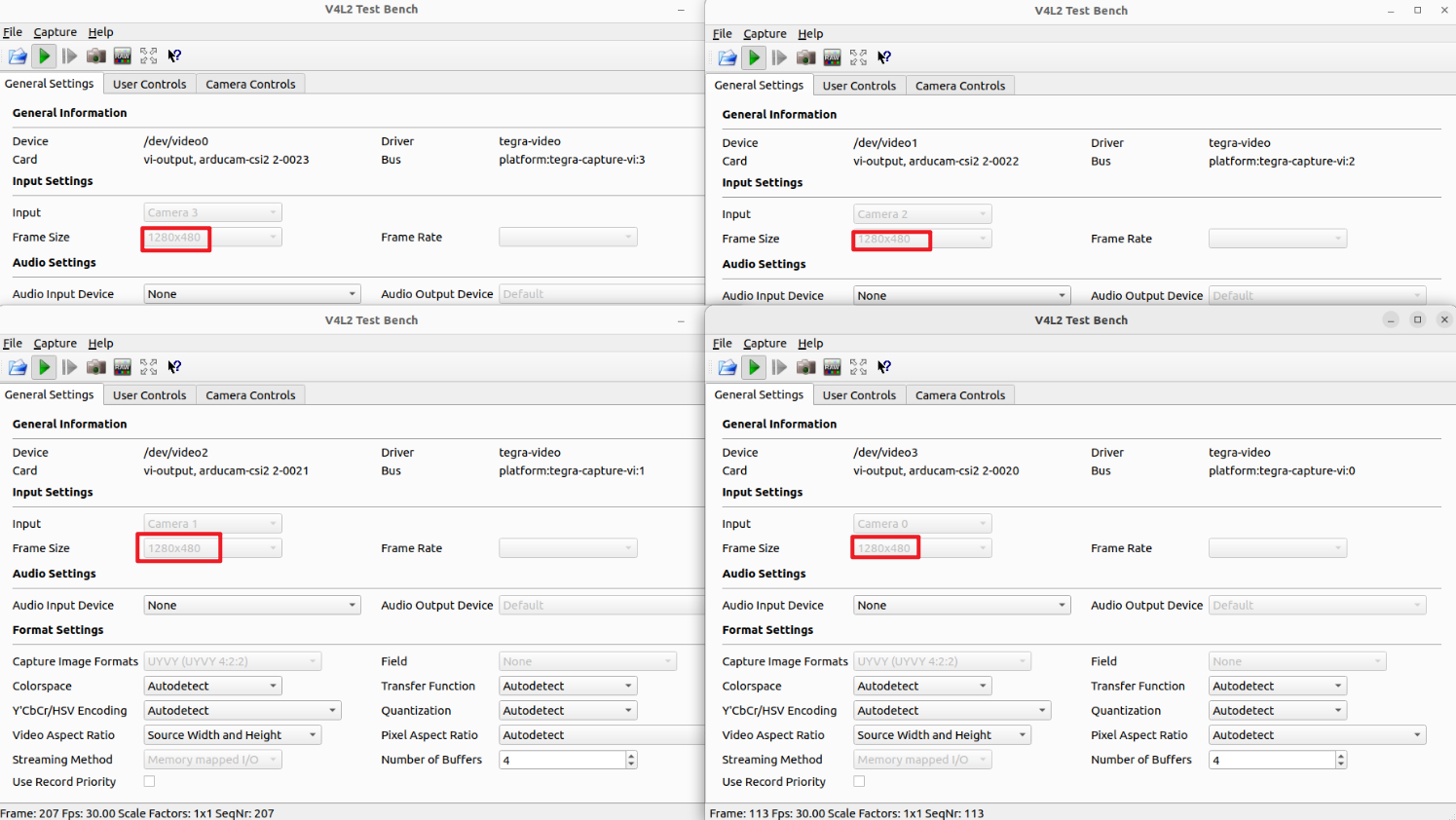
Resolution & Frame Rate
3840x1200@30fps
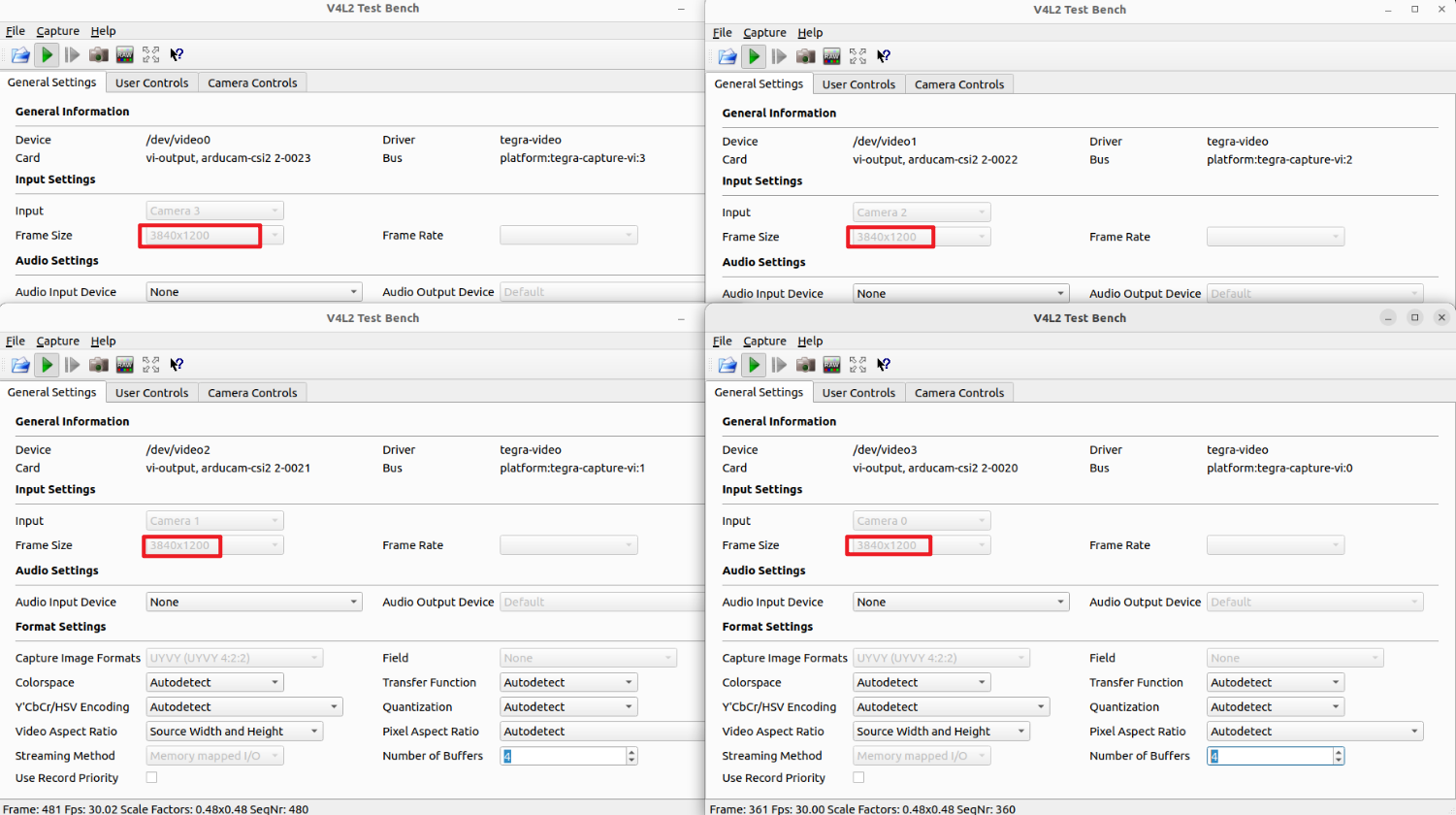
2560x720@30fps
1280x480@30fps
Quick Start Guide - NVIDIA Jetson Native Camera
The following tutorial is suitable for the camera kits below:
| Product Image | SKU | Pin/Connect Type | Sensor | Resolution | Features | Lens Mount | Field of View(HxV) | Focus Type | IR Sensitivity |
|---|---|---|---|---|---|---|---|---|---|
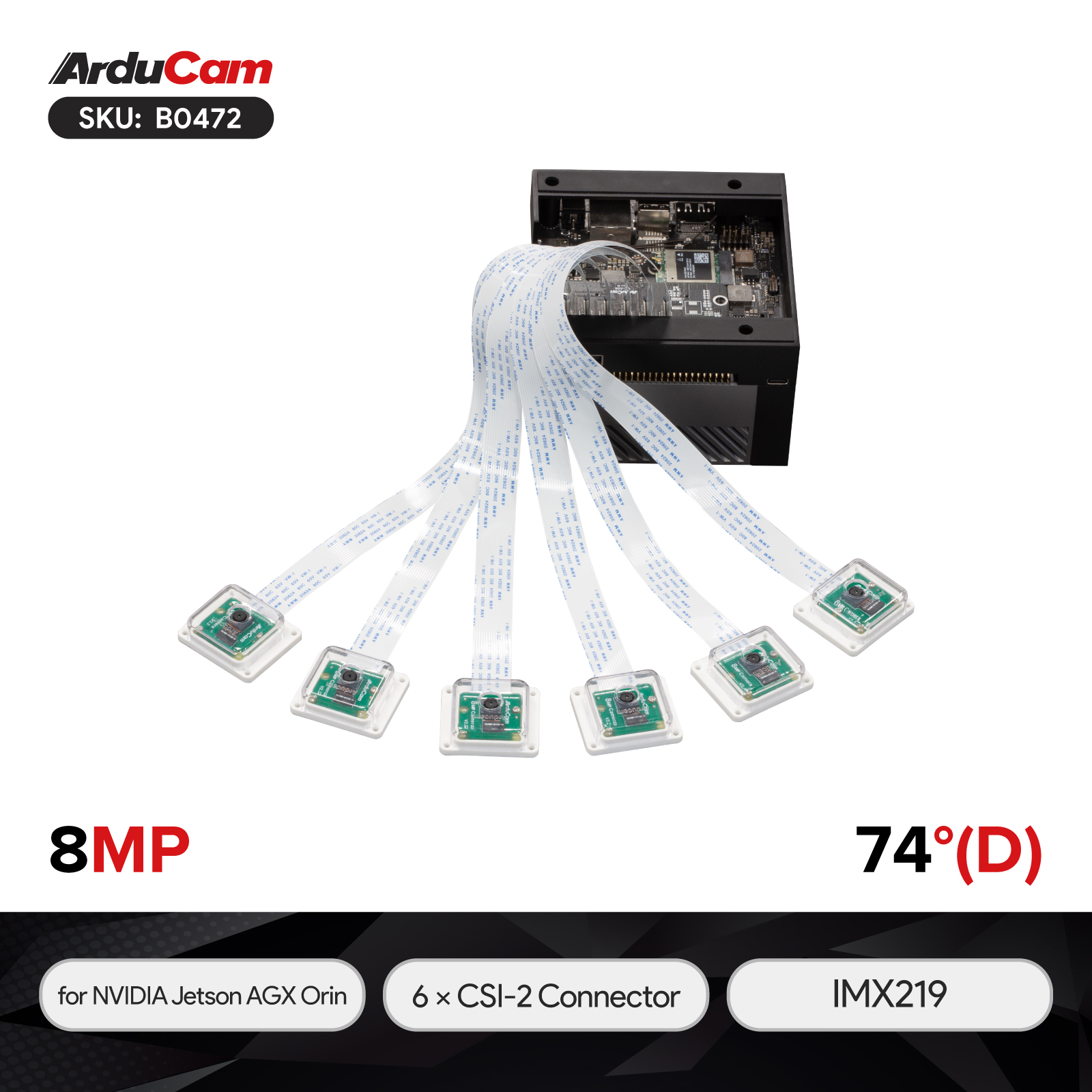 |
B0472 | 15/bottom | IMX219 | 8MP | 6xCam Kit | Stock Lens Mount | 74°(D) | Fixed Focus | 650nm IR-cut filter |
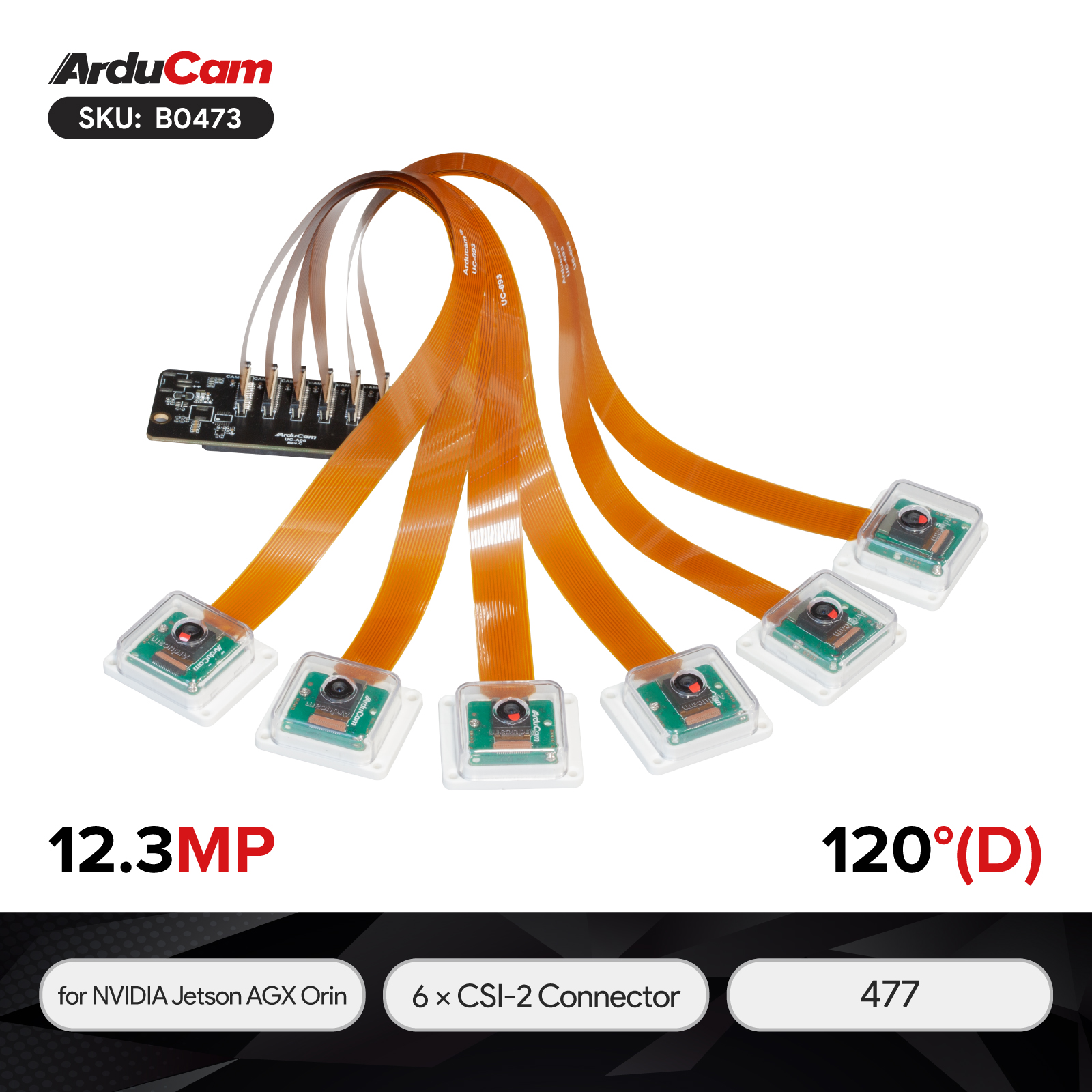 |
B0473 | 15/bottom | IMX477 | 12MP | 6xCam Kit | M12 Mount | 120°(D) | Fixed Focus | 650nm IR-cut filter |
Hardware Connection
Note
The access of all Arducam camera kits must be based on NVIDIA Jetson AGX Orin official kits, Arducam dedicated camera adapter boards, and systems we support.
You can refer to the following doc to get all versions and systems supported on NVIDIA Jetson AGX Orin: Click Here
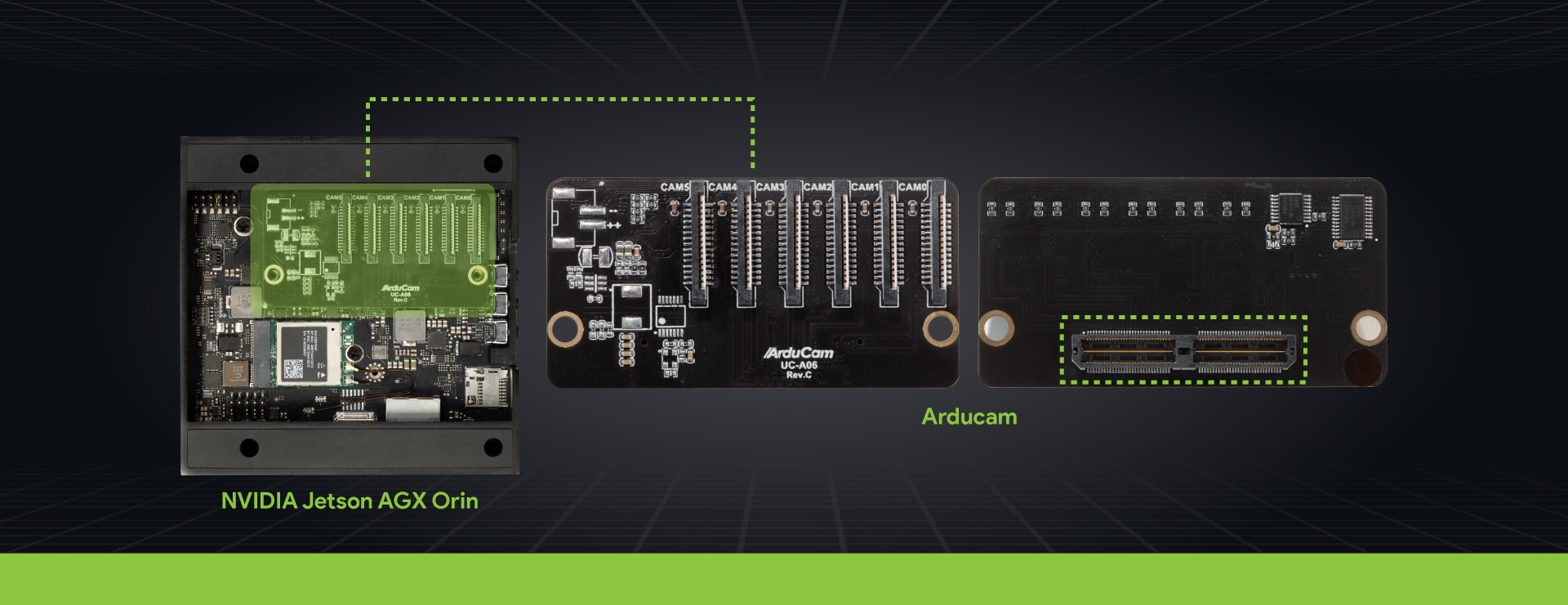
- Connect the Adapter Board with NVIDIA Jetson AGX Orin
Connect the male connector on the camera adapter board to the female connector on the AGX Orin Board
Please try to make this process as gentle as possible. You can see the connection diagram below:
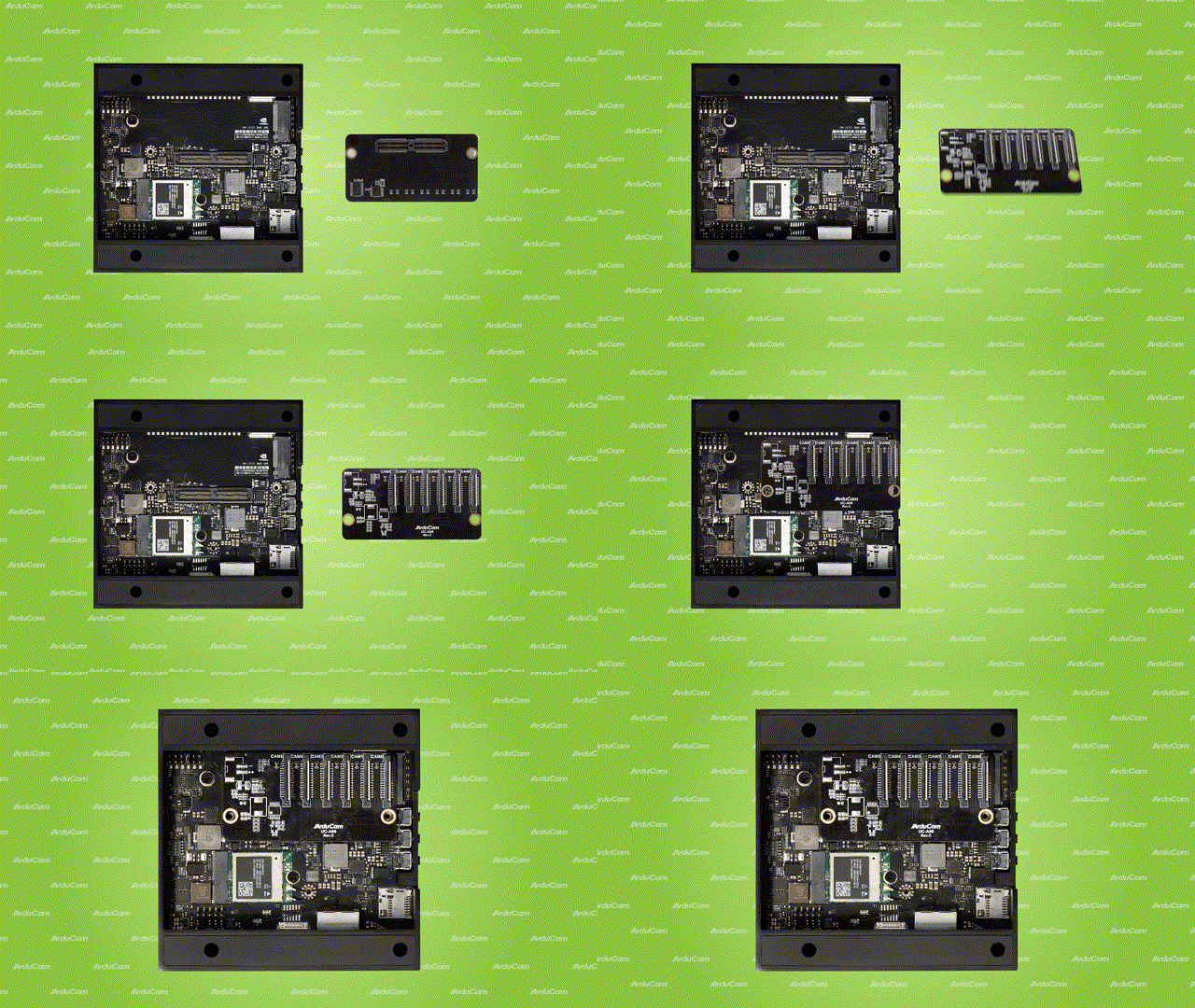
Note
The NVIDIA Jetson AGX Orin camera board supports 6x MIPI CSI interfaces, which can be connected up to 6 cameras (currently only 6 of the same camera are supported, if you need other combinations, please contact sales@arducam.com for customization). Each MIPI CSI interface currently only supports 2-lane configuration.
- Connect the Camera Module
Pull up on the plastic edge of the camera port. Be gentle to avoid pulling it off.
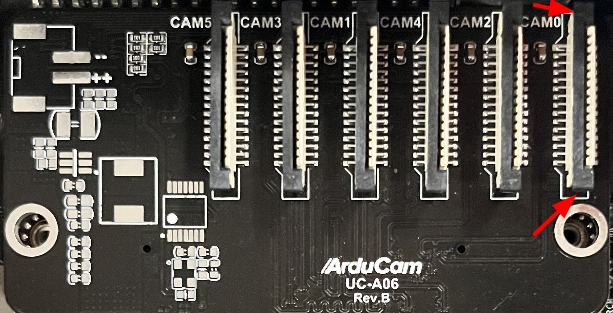
Demonstration:
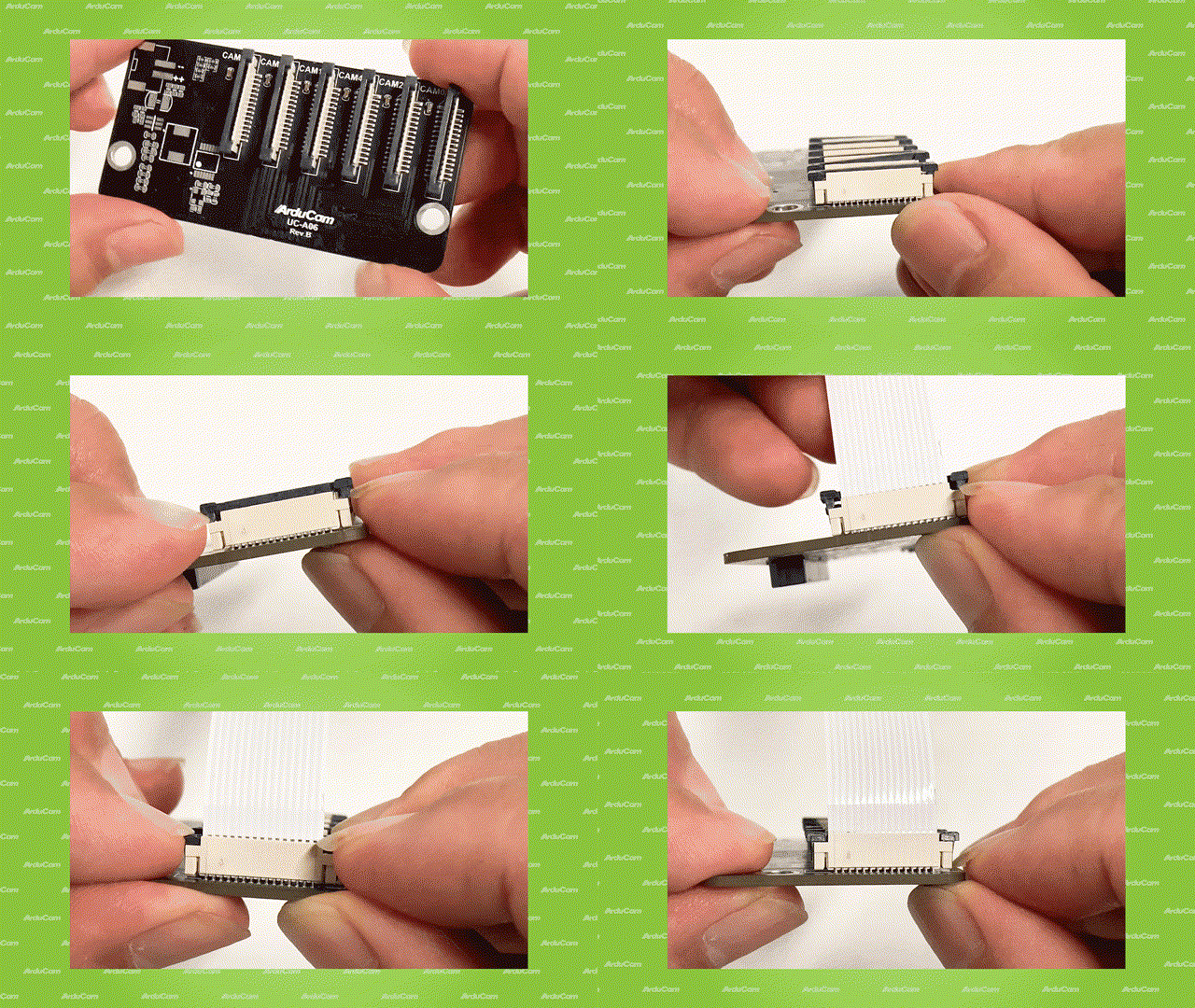
Ribbon cable fully inserted to the bottom of the CSI connector>>>
Push the plastic connector down. Do it while holding the flex cable until the connector is back in place.
- Connection Diagram:
 |
 |
Attention!
Note
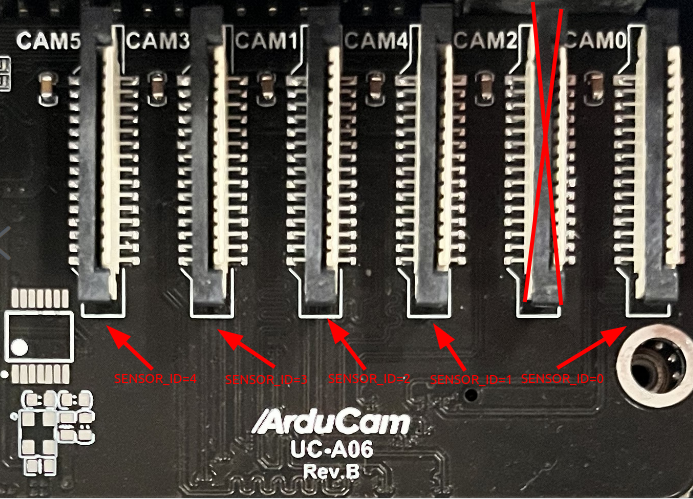
SENSOR_ID indicates the selected camera. This value does not correspond to the silkscreen on the camera board.
It is sorted according to the direction starting from the silkscreen camera0 on the camera board.
For example, when all six MIPI csi interface are connected to the camera, the corresponding SENSOR_ID value is 0. 1, 2, 3, 4, 5.
For example, when you connect all six cameras to the MIPI CSI interface, the corresponding SENSOR_ID values are like:
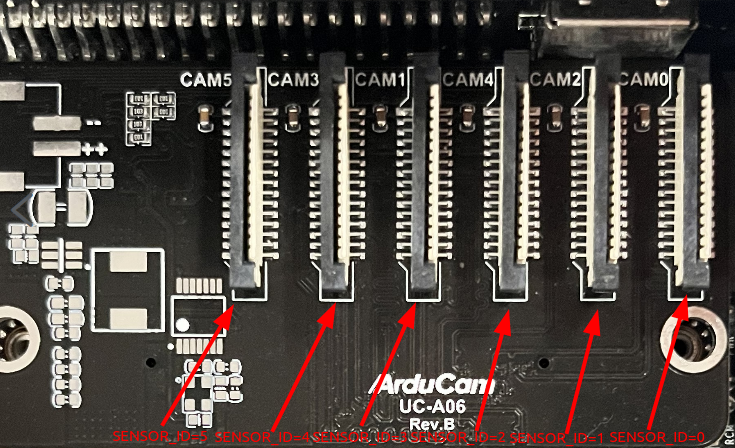
If don't use the cam2 MIPI csi interface:
Software
-
Supported Platforms and JetPack L4T versions
Please refer to the following doc for specific supported Platforms and JetPack versions:
Supported Platforms and JetPack Version - Arducam Camera for NVIDIA Jetson
For IMX219 Camera Module

- Install Camera Driver
cd ~
wget https://github.com/ArduCAM/MIPI_Camera/releases/download/v0.0.3/install_full.sh
chmod +x ./install_full.sh
./install_full.sh -m imx219
- Reboot
sudo reboot
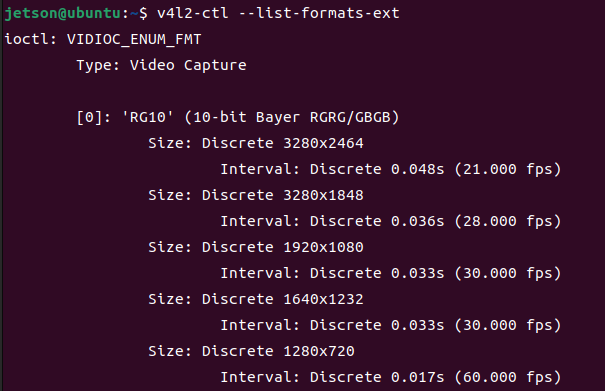
- Check Resolution&Frame Rate via V4L2
v4l2-ctl --list-formats-ext
- Access the Camera Kit
For the three values of FRAMERATE, width, and height, please fill in the configuration you want to use according to the resolution and frame rate information obtained by v4l2-ctl (do not exceed the upper limit of the frame rate corresponding to the resolution)
SENSOR_ID=0
FRAMERATE=21
width=3280
height=2464
gst-launch-1.0 nvarguscamerasrc sensor-id=$SENSOR_ID ! "video/x-raw(memory:NVMM),width=$width,height=$height,framerate=$FRAMERATE/1" ! nvvidconv ! nveglglessink -e
For IMX477 Camera Module

- Install Camera Driver
cd ~
wget https://github.com/ArduCAM/MIPI_Camera/releases/download/v0.0.3/install_full.sh
chmod +x ./install_full.sh
./install_full.sh -m imx477
- Reboot
sudo reboot
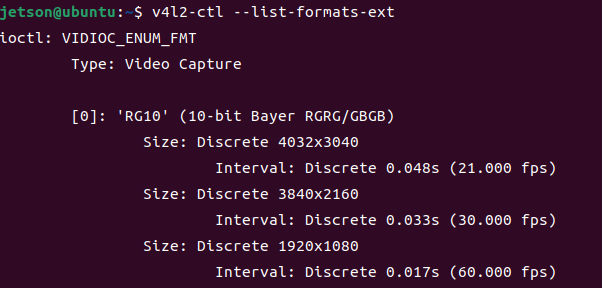
- Check Resolution&Frame Rate via V4L2
v4l2-ctl --list-formats-ext
- Access the Camera Kit
For the three values of FRAMERATE, width, and height, please fill in the configuration you want to use according to the resolution and frame rate information obtained by v4l2-ctl (do not exceed the upper limit of the frame rate corresponding to the resolution)
SENSOR_ID=0
FRAMERATE=21
width=4032
height=3040
gst-launch-1.0 nvarguscamerasrc sensor-id=$SENSOR_ID ! "video/x-raw(memory:NVMM),width=$width,height=$height,framerate=$FRAMERATE/1" ! nvvidconv ! nveglglessink -e
After the L4T version 39.2.0, you need to use the following command to access the camera kit:
SENSOR_ID=0
FRAMERATE=21
width=4032
height=3040
gst-launch-1.0 nvarguscamerasrc sensor-id=$SENSOR_ID ! "video/x-raw(memory:NVMM),width=$width,height=$height,framerate=$FRAMERATE/1" ! nvvidconv ! "video/x-raw(memory:NVMM)" ! nv3dsink -e
For IMX519 Camera Module

- Install Camera Driver
cd ~
wget https://github.com/ArduCAM/MIPI_Camera/releases/download/v0.0.3/install_full.sh
chmod +x ./install_full.sh
./install_full.sh -m imx519
- Reboot
sudo reboot
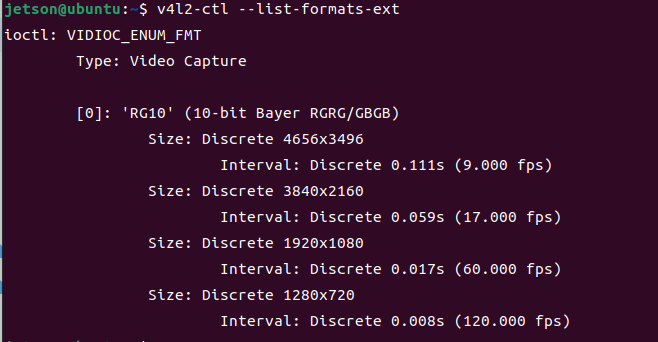
- Check Resolution&Frame Rate via V4L2
v4l2-ctl --list-formats-ext
- Access the Camera Kit
For the three values of FRAMERATE, width, and height, please fill in the configuration you want to use according to the resolution and frame rate information obtained by v4l2-ctl (do not exceed the upper limit of the frame rate corresponding to the resolution)
SENSOR_ID=0
FRAMERATE=9
width=4656
height=3496
gst-launch-1.0 nvarguscamerasrc sensor-id=$SENSOR_ID ! "video/x-raw(memory:NVMM),width=$width,height=$height,framerate=$FRAMERATE/1" ! nvvidconv ! nveglglessink -e
After the L4T version 39.2.0, you need to use the following command to access the camera kit:
SENSOR_ID=0
FRAMERATE=21
width=4032
height=3040
gst-launch-1.0 nvarguscamerasrc sensor-id=$SENSOR_ID ! "video/x-raw(memory:NVMM),width=$width,height=$height,framerate=$FRAMERATE/1" ! nvvidconv ! "video/x-raw(memory:NVMM)" ! nv3dsink -e
Related Docs
Introduction to Arducam Camera Solution for NVIDIA Jetson AGX Orin